
Saturday, April 19, 2008
Monday, April 14, 2008
My Heroes Have Always Been Software Geeks
Posted by
Louisa Holland
at
Monday, April 14, 2008
3
comments
Monday, April 07, 2008
Vista 64 & Civil 3D 2008
I've decided to go cold turkey. I've got a new laptop running Vista 64 bit, and I'm not looking back. In a weird twist of what I believe to be true irony (as opposed to what Alanis Morrisette finds Ironic) it was easier to hack my Civil 3D 2008 and get it installed than it was to get the 2009 stuff installed. Some of your may know that C3D'08 will kick you out of the default install, while C3D'09 should install just fine. (Subscription Customers: You will start getting those DVD's in the mail starting at the end of next week.)
So...how did I do it? It was actually way easier than I thought.
Step 1: First, you find, download and install this thing from Microsoft called Orca.
I actually got mine from here, instead of downloading a big package from Microsoft.
Step 2: Copy the entire contents of the C3D2008 DVD onto a spot on your hard-drive. (I roll with an external 250gig USB drive, 'cuz I'm crazy like that.)
Step 3: Make backup copies of your C3D.msi and setup.ini files. I made copies and renamed them C3D-orig.msi and setup-orig.ini respectively.
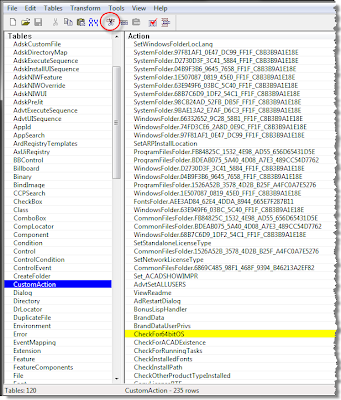
Step 4: Fire up that Orca thing. Open the C3D.msi file and delete 2 lines out of the whole thing:
Select CustomAction on the left, then pick CheckFor64BitOS in the main part of the screen. Click the Cut button or the Delete key on your keyboard.
Do the same thing for InstallExecuteSequence. Delete CheckFor64BitOS in there too.
Save the msi and close Orca.
Step 5: Edit the Setup.ini with Notepad. Delete the line under
"#==================== Platform Requirement" that is labeled
"PLATFORM=NO_WOW_64_PROCESS"
Save the setup.ini file.
Step 6: Run setup.exe per usual and bask in the hacker glory of it all.
Step 7: If something goes wrong - don't blame me or Autodesk. YOU are the hacker, punk.
So...how did I do it? It was actually way easier than I thought.
Step 1: First, you find, download and install this thing from Microsoft called Orca.
I actually got mine from here, instead of downloading a big package from Microsoft.
Step 2: Copy the entire contents of the C3D2008 DVD onto a spot on your hard-drive. (I roll with an external 250gig USB drive, 'cuz I'm crazy like that.)
Step 3: Make backup copies of your C3D.msi and setup.ini files. I made copies and renamed them C3D-orig.msi and setup-orig.ini respectively.
Step 4: Fire up that Orca thing. Open the C3D.msi file and delete 2 lines out of the whole thing:
Select CustomAction on the left, then pick CheckFor64BitOS in the main part of the screen. Click the Cut button or the Delete key on your keyboard.
Do the same thing for InstallExecuteSequence. Delete CheckFor64BitOS in there too.
Save the msi and close Orca.

Step 5: Edit the Setup.ini with Notepad. Delete the line under
"#==================== Platform Requirement" that is labeled
"PLATFORM=NO_WOW_64_PROCESS"
Save the setup.ini file.
Step 6: Run setup.exe per usual and bask in the hacker glory of it all.
Step 7: If something goes wrong - don't blame me or Autodesk. YOU are the hacker, punk.
Posted by
Louisa Holland
at
Monday, April 07, 2008
6
comments
Tuesday, March 25, 2008
Play It, Sam
Casablanca fans unite: The line is not "Play it again, Sam." but simply "Play it, Sam."
Anyhoo...
Many of you already know (and love?) FLEXLM utilities that are needed for network licensing of Autodesk products. Did you also know that there is a utility that comes free with most Autodesk products and can be used for more in-depth license reporting? The utility I’m talking about is SamReport-Lite, by Macrovision.
With this tool you can get a very clear picture of how many licenses are being used and by whom throughout the day. It can help you make decisions as to whether or not you need more licences.
The only trouble is that the documentation that comes on the DVD is not Autodesk-specific and is confusing. People commonly get Java error messages installing off the DVD and just give up.
The following instructions will get you past all the confusion. As long as you know how to install FlexLM, you can get through the document.
sam-report-lite-setup.pdf
Good luck and happy reporting!
Anyhoo...
Many of you already know (and love?) FLEXLM utilities that are needed for network licensing of Autodesk products. Did you also know that there is a utility that comes free with most Autodesk products and can be used for more in-depth license reporting? The utility I’m talking about is SamReport-Lite, by Macrovision.
With this tool you can get a very clear picture of how many licenses are being used and by whom throughout the day. It can help you make decisions as to whether or not you need more licences.
The only trouble is that the documentation that comes on the DVD is not Autodesk-specific and is confusing. People commonly get Java error messages installing off the DVD and just give up.
The following instructions will get you past all the confusion. As long as you know how to install FlexLM, you can get through the document.
sam-report-lite-setup.pdf
Good luck and happy reporting!
Posted by
Louisa Holland
at
Tuesday, March 25, 2008
0
comments
Monday, March 24, 2008
How to Be One of My Favorites
I admit it, I play favorites when it comes to the people I train and support on a daily basis. But what is the difference between someone I will go to the ends of the earth to help, versus someone I'd rather not give the time of day?
My Faves...
- Try. They might not understand right away, but they want to.
- Go through the proper channels for tech support. It drives me up the wall when people call my direct line for tech support - we have a 1-800 number for that, which gets tracked.
- Are on subscription. Sometimes the best fix is installing a more current release.
- Listen. It's easy to get worked up when deadlines loom and the software isn't behaving. Talking over me and/or being pushy will not help you.
- Write things down. Odds are you'll need to need to perform the procedure again at some point. Why not jot down a few notes?
- Understand the difference between training and support. There's a difference between, "How do I build an alignment?" and "Why is my alignment acting funny?"
- Realize that there are humans on the other end of the phone line or e-mail correspondence. Its funny, there's this person who insists on referring to me by the name of the company I work for, and acts as if all the email he gets from us were computer generated. This a rarity but it rubs me the wrong way.
Posted by
Louisa Holland
at
Monday, March 24, 2008
0
comments
Subscribe to:
Posts (Atom)
