
I've decided to go cold turkey. I've got a new laptop running Vista 64 bit, and I'm not looking back. In a weird twist of what I believe to be true irony (as opposed to what Alanis Morrisette finds Ironic) it was easier to hack my Civil 3D 2008 and get it installed than it was to get the 2009 stuff installed. Some of your may know that C3D'08 will kick you out of the default install, while C3D'09 should install just fine. (Subscription Customers: You will start getting those DVD's in the mail starting at the end of next week.)
So...how did I do it? It was actually way easier than I thought.
Step 1: First, you find, download and install this thing from Microsoft called Orca.
I actually got mine from here, instead of downloading a big package from Microsoft.
Step 2: Copy the entire contents of the C3D2008 DVD onto a spot on your hard-drive. (I roll with an external 250gig USB drive, 'cuz I'm crazy like that.)
Step 3: Make backup copies of your C3D.msi and setup.ini files. I made copies and renamed them C3D-orig.msi and setup-orig.ini respectively.
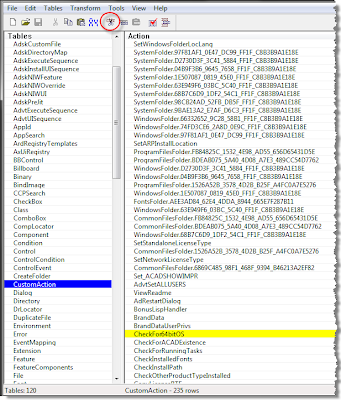
Step 4: Fire up that Orca thing. Open the C3D.msi file and delete 2 lines out of the whole thing:
Select CustomAction on the left, then pick CheckFor64BitOS in the main part of the screen. Click the Cut button or the Delete key on your keyboard.
Do the same thing for InstallExecuteSequence. Delete CheckFor64BitOS in there too.
Save the msi and close Orca.
Step 5: Edit the Setup.ini with Notepad. Delete the line under
"#==================== Platform Requirement" that is labeled
"PLATFORM=NO_WOW_64_PROCESS"
Save the setup.ini file.
Step 6: Run setup.exe per usual and bask in the hacker glory of it all.
Step 7: If something goes wrong - don't blame me or Autodesk. YOU are the hacker, punk.
So...how did I do it? It was actually way easier than I thought.
Step 1: First, you find, download and install this thing from Microsoft called Orca.
I actually got mine from here, instead of downloading a big package from Microsoft.
Step 2: Copy the entire contents of the C3D2008 DVD onto a spot on your hard-drive. (I roll with an external 250gig USB drive, 'cuz I'm crazy like that.)
Step 3: Make backup copies of your C3D.msi and setup.ini files. I made copies and renamed them C3D-orig.msi and setup-orig.ini respectively.
Step 4: Fire up that Orca thing. Open the C3D.msi file and delete 2 lines out of the whole thing:
Select CustomAction on the left, then pick CheckFor64BitOS in the main part of the screen. Click the Cut button or the Delete key on your keyboard.
Do the same thing for InstallExecuteSequence. Delete CheckFor64BitOS in there too.
Save the msi and close Orca.

Step 5: Edit the Setup.ini with Notepad. Delete the line under
"#==================== Platform Requirement" that is labeled
"PLATFORM=NO_WOW_64_PROCESS"
Save the setup.ini file.
Step 6: Run setup.exe per usual and bask in the hacker glory of it all.
Step 7: If something goes wrong - don't blame me or Autodesk. YOU are the hacker, punk.


 Posts

