I don't recall if I blogged this yet. Better twice than not at all.
So you've downloaded all the files from:
ftp://ftp.dot.state.wi.us/transp/roads/civil3d/
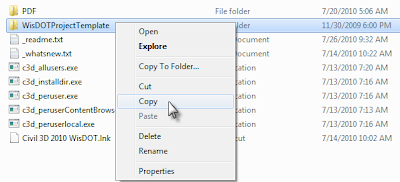
Right-click the directory and select copy.

So you've downloaded all the files from:
ftp://ftp.dot.state.wi.us/transp/roads/civil3d/
- c3d_allusers.exe
- c3d_installdir.exe
- c3d_peruser.exe
- c3d_perusercontentbrowserlibrary.exe
- c3d_peruserlocal.exe
Right-click the directory and select copy.

Paste the directory under C:\Civil 3D Project Templates.
If you are on Windows XP I've got mixed news:
1) You should probably think about moving to Windows 7. Windows 7 is much better at handling the memory needed to run Civil 3D well. Besides, Microsoft will stop supporting XP soon.
2) The good news is that the Wisdot exe files will slide right onto your system.
Ok - so for the rest of us who are on Windows 7, you'll need to do some tweaking to get the WisDOT files placed correctly.
Double click the exe from WisDOT.
Click Run

You need to browse each and every time for the correct directory.
- c3d_allusers.exe needs to go to: C:\Program Data\AutoDesk\C3D 2010\enu\
- This folder contains:
- WisDOT intersection assemblies and underlying dlls.
- WisDOT Figure prefix database
- WisDOT design criteria XML files.
- Several Wisconsin-specific reports
- The SRV-to-PNTFLT.dvb mentioned in my last post
- c3d_installdir.exe must be extracted to: C:\Program Files\AutoCAD Civil 3D 2010\
- NOTE: You'll need to set this to C:\Program Files (x86)\AutoCAD Civil 3D 2010\ if you are on 64 bit system.
- This folder contains:
- Linetypes, font and supporting files
- Help files for WisDOT custom subassemblies
- c3d_peruser.exe gets extracted to: C:\Users\-user-
\AppData\Roaming\Autodesk\C3D 2010\enu - NOTE: This step will overwrite customizations to your c3d.cuix file - I recommend keeping your own intact by renaming it before you copy.
- This folder contains:
- Plotter information
- Toolpalette files
- CUI file
- DGN setups
- c3d_perusercontentLibrary.exe goes to: C:\Users\-user-
\Documents\Autodesk\ - Overwrite & merge the My Content Browser Library
- The WisDOT catalog file that will help make importing the subassemblies to your tool palette easier.
- c3d_peruserlocal.exe gets extracted to: C:\Users\-user-
\AppData\Local\Autodesk\C3D 2010\enu\ - This contains all the WisDOT templates.
- Merge and replace when prompted.
By extracting everything local, no changes need to be made in Options to your profile.
You can network many of these items, such as plotter settings linetypes, fonts and templates. However, DO NOT attempt to network the subassemblies themselves. I've never seen it work properly.
These files only work in Civil 3D 2010 - not at all in 2011. Some of the reports may not work correctly on 64 bit systems (such as the SEUpdate.dll).
If the contents of this blog post confuse you, please get help trying to extract these files to the correct place.
I am available for consulting on these matters through my employer.


 Posts
Posts

